Mocking APIs in Jest — Expense Tracker Edition
Our Expense Tracker is getting smarter with every post.
Mocking APIs in Jest — Expense Tracker Edition
Our Expense Tracker is getting smarter with every post.
It can calculate totals
find the highest expense
and even handle errors.
But there is one thing it has never done before — talk to the outside world.
Today, it finally learns how to fetch data from a server
and you will learn how to mock that API call using Jest so your tests never break because of bad Wi-Fi or flaky servers.
💡 Why APIs Need Mocking

APIs are like friends who promise to show up on time… but sometimes they don’t.
Maybe they respond late.
Maybe they forget something.
Or maybe they just disappear without saying goodbye.
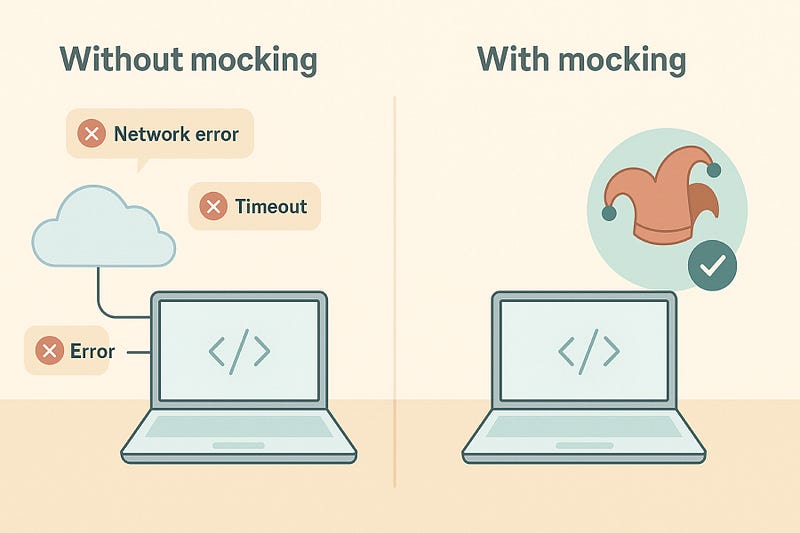
When your code depends on such unpredictable friends, your tests will break for reasons that have nothing to do with your logic.
Mocking lets you create a perfect version of the world inside Jest.
You tell it how the API should behave…
and Jest plays along every single time.
That means your tests run fast, stable, and offline — the dream setup for any developer.
⚙️ Step 1 — Create a Small API Function
Let’s start with a tiny function that fetches expenses from a server.
📁 expenseApi.js
const fetch = require('node-fetch');

conat url = “https://api.example.com/users/”

const fetchExpenses async = (userId) => {
  const response = await fetch(‘${url}${userId}/expenses’);
  if (!response.ok) {
    throw new Error('Network response was not ok');
  }
  const data = await response.json();
  return data;
}

module.exports = { fetchExpenses };
This is our real function — simple and innocent.
Now let’s teach Jest how to “pretend” this works even without an actual server.
🧪 Step 2 — Mock the API Inside Jest
Create a test file named expenseApi.test.js.
const { fetchExpenses } = require('./expenseApi');
const fetch = require('node-fetch');

jest.mock('node-fetch');

test('should return expenses when API succeeds', async () => {
  const mockResponse = {
    ok: true,
    json: async () => [{ id: 1, amount: 100 }, { id: 2, amount: 200 }]
  };

  fetch.mockResolvedValue(mockResponse);

  const result = await fetchExpenses('user123');
  expect(result.length).toBe(2);
  expect(result[0].amount).toBe(100);
});

test('should throw error when API fails', async () => {
  const mockResponse = { ok: false };
  fetch.mockResolvedValue(mockResponse);

  await expect(fetchExpenses('user123')).rejects.toThrow('Network response was not ok');
});
Now run:
npm test✅ Jest acts like a perfect actor — playing both the server and your function’s response.
No internet…
no delay…
just results.
🧠 Step 3 — Understand What’s Happening
Let’s break it down in plain English.
When we write jest.mock('node-fetch'), Jest replaces the real fetch call with our own version.
Then we tell Jest exactly what that fake fetch should return — success or failure.
So the first test says:
“If the API returns data, make sure the total matches.”
And the second test says:
“If the API fails, make sure our function throws the right error.”
That’s how we simulate reality without depending on it.
⚡ Step 4 — Mocking at a Higher Level
In real projects, we usually do not test every small fetch call.
Instead, we test the functions that use the API.
Let’s look at example.
📁 expenseLogic.js
const { fetchExpenses } = require('./expenseApi');

async function getUserExpenseTotal(userId) {
  const list = await fetchExpenses(userId);
  return list.reduce((a, b) => a + b.amount, 0);
}

module.exports = { getUserExpenseTotal };
Now our test only needs to fake the data, not the network itself.
📁 expenseLogic.test.js
const { getUserExpenseTotal } = require('./expenseLogic');
const expenseApi = require('./expenseApi');

test('should return total expense using mocked API', async () => {
  expenseApi.fetchExpenses = jest.fn().mockResolvedValue([{ amount: 50 }, { amount: 150 }]);
  const total = await getUserExpenseTotal('user123');
  expect(total).toBe(200);
});
This approach is faster, simpler, and easier to maintain.
You can test your app logic without worrying about actual HTTP calls.
💬 A Real-World Thought
I once worked on a project where every test touched the live API.
It took ten minutes to run the suite… sometimes even longer.
Nobody wanted to wait… so they stopped running tests at all.
The day we introduced mocks, everything changed.
The suite went from ten minutes to ten seconds.
Developers ran tests after every small change.
Confidence returned.
That is when I learned — speed builds habit… and habit keeps quality alive.
🧩 A Small Caution
Mocking is powerful, but do not overuse it.
A few real integration tests with a staging server keep your confidence grounded.
Mocks give you speed…
but real tests give you trust.
You need both.
✅ Summary
In this post, our Expense Tracker learned how to fetch data from an API… without ever leaving the local world.
We mocked both success and failure cases using Jest.
We understood how mocking replaces uncertainty with control…
and how it turns testing into something fast, fun, and fearless.
In the next post, we’ll go deeper into mocking our own functions and using spies — the tools that let you watch your functions silently without changing their behavior.
💬 Comment what confused you most about testing — I’ll cover it in the next post.
Thanks for reading.
I explain things in simple words so learning stays easy today and even years later.
If this added value, follow me for more clear and practical posts.
— Alkesh Jethava
Previous: #4 Testing Error Handling in Jest – Expense Tracker Edition
Next: #6 🕵🏻 Mocking Functions and Spies in Jest — Expense Tracker Edition