State Management in React Native: Tools, Techniques, and Examples
it’s a topic every React Native developer has to tackle sooner or later.
State Management in React Native: Tools, Techniques, and Examples

State management
it’s a topic every React Native developer has to tackle sooner or later.
If you’re building apps that need to juggle dynamic data, user interactions, or real-time updates, understanding state management is essential.
Are you a developer facing challenges with growing app complexity?
Or maybe you’re curious about which tools can help keep your project smooth and maintainable?
Then you’re in the right place.
This guide dives into state management tailored for React Native, so whether you’re working on small apps or massive projects, you’ll walk away with actionable strategies.
I’ll not only explain concepts but also provide practical examples to give you a clear roadmap to success.
State management is at the core of React Native development.
Whether you’re working on a simple to-do list app or a feature-rich e-commerce application, efficiently managing the state ensures your app functions as expected.
Let me walk you through the key concepts, state management tools, and best practices based on my experience as a React Native developer.
Why Do We Need State Management?
State refers to the data that drives the behavior and appearance of your app. Managing this data properly becomes essential when:
- Multiple components share the same data.
- Data updates frequently.
- UI components need to react to specific changes in the data.
- App complexity grows.
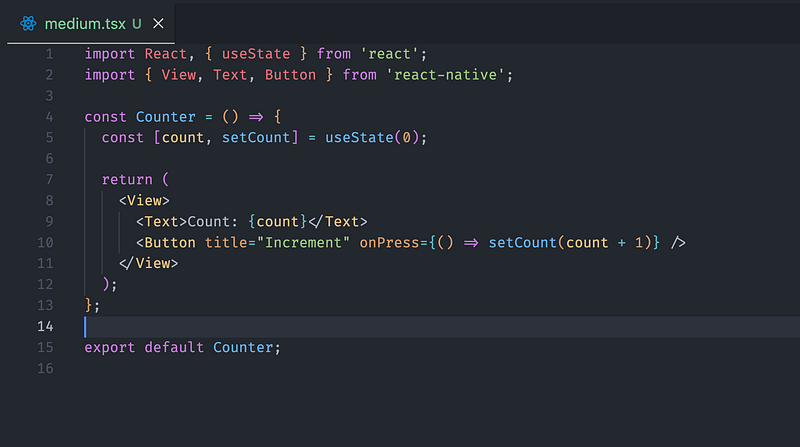
React Native provides tools like useState and useReducer for local state management. However, as your app scales, you need more robust solutions for shared or global state.
Categories of State Management
- Local State
- Managed within a component using hooks like
useStateanduseReducer. - Best for simple, isolated data needs.
2. Global State
- Data shared across multiple components.
- Libraries like Redux, Context API, and Zustand make it easier to manage global state.
3. Server State
- Fetched from a server and synchronized with the UI.
- Tools like React Query help manage server state seamlessly.
4. Form State
- Handles inputs and validations.
- Libraries like Formik and React Hook Form simplify form state management.
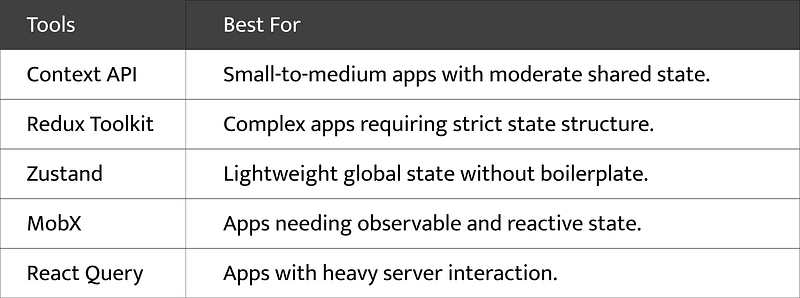
Choosing a State Management Tool
Here’s a breakdown of tools based on app complexity:
Context API with Example
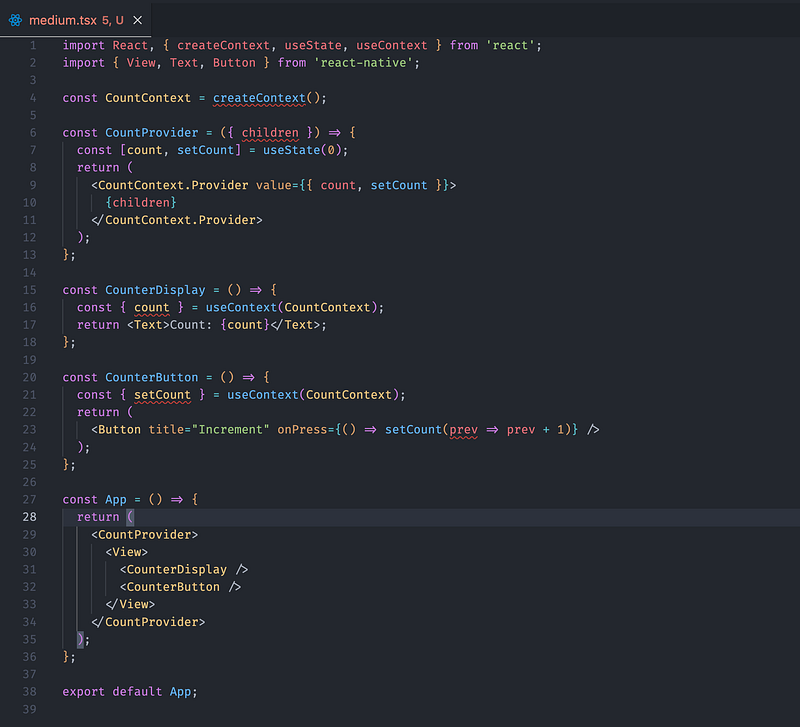
The Context API is built into React and is perfect for simpler apps. Here’s how you can use it:
Steps:
- Create a context.
- Provide the context to components.
- Consume the context.
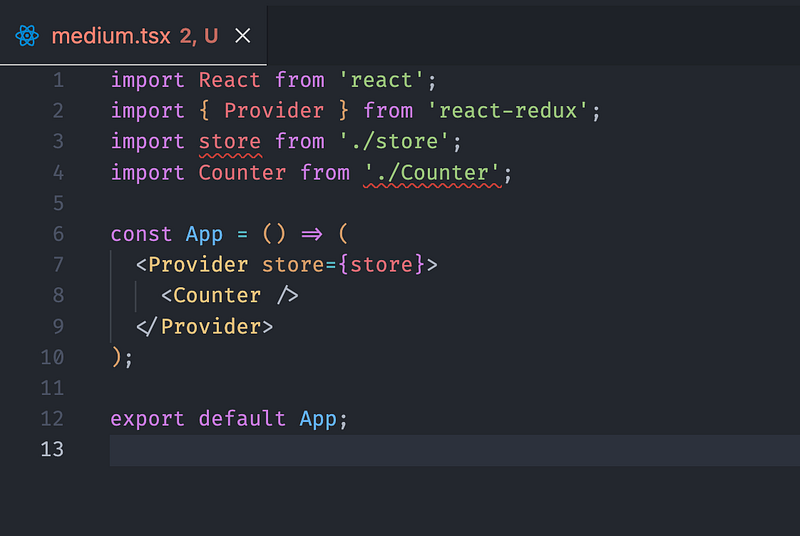
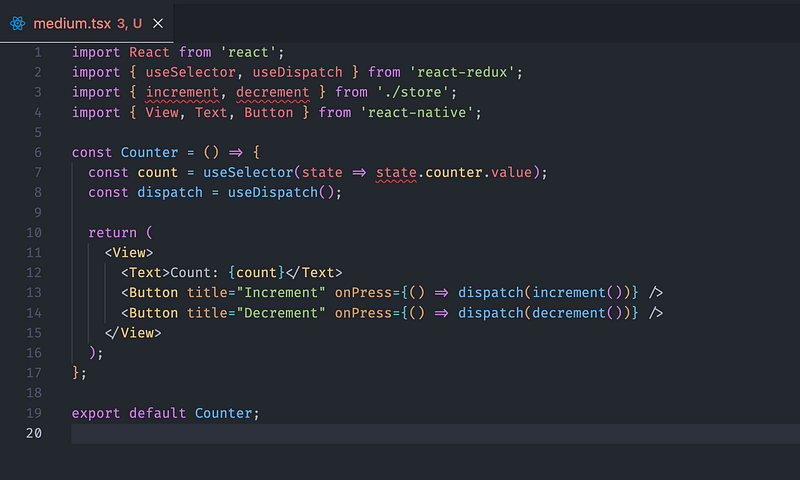
Redux Toolkit for Scalable Apps
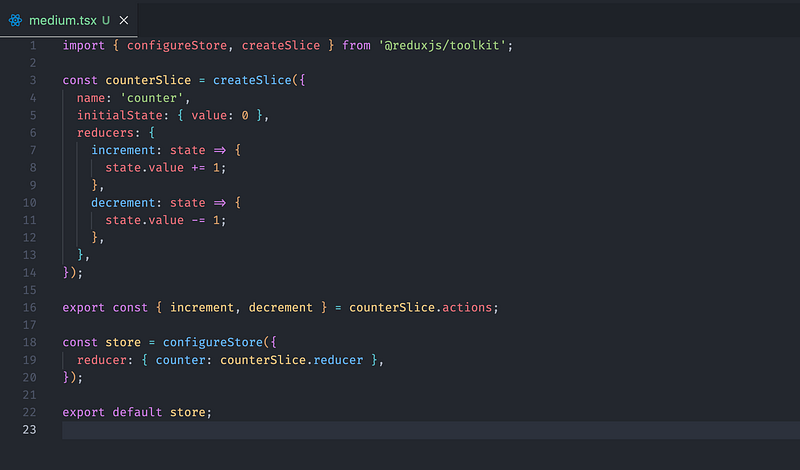
Redux Toolkit simplifies Redux by reducing boilerplate and adding powerful features like createSlice and configureStore.
Example:
- Setup the Store
2. Provide the Store
3. Consume State
Visualizing State
Including visuals in your documentation can clarify concepts. Use diagrams like:
- State Flow in Context API
- Redux Store Architecture
- Component Interaction in Zustand
You can design these using tools like Figma, Excalidraw, or even hand-drawn sketches.
State management can seem overwhelming at first, but the right choice depends on your app’s complexity and requirements.
Start simple with useState or Context API, and adopt advanced tools like Redux Toolkit or Zustand as needed.
Investing time in mastering state management is invaluable — it makes your code cleaner, easier to maintain, and scalable.
Try these approaches in your next project, and share your experience!
Enjoyed this article?
Follow me on Medium for more insightful content on React Native, app development, and the latest tech trends.
Have questions or a different perspective? I’d love to hear your thoughts in the comments!
Thanks for reading! If you found this helpful, feel free to share it with your network or save it for later.