Multi-Repo Architecture
We have previously learnt about Monorepo architecture.
Multi-Repo Architecture
A Practical Guide
We have previously learnt about Monorepo architecture.
Today we will learn about Multi-Repo architecture.
In software development, organizing your code efficiently is crucial, especially when working with large teams and multiple features.
One popular way to structure your project is by using a multi-repo architecture.
In this article, we’ll explore what multi-repo architecture is, why you should consider it, and how to set it up effectively.
Then, Let’s get started
first of all,
What is Multi-Repo Architecture?
Multi-repo (short for multiple repositories) means splitting your codebase into multiple repositories, where each repository contains a specific feature, module, or service of your application.
This approach allows teams to work independently on different parts of the project without interfering with each other’s work.
For example, instead of having one huge codebase,
you can have:
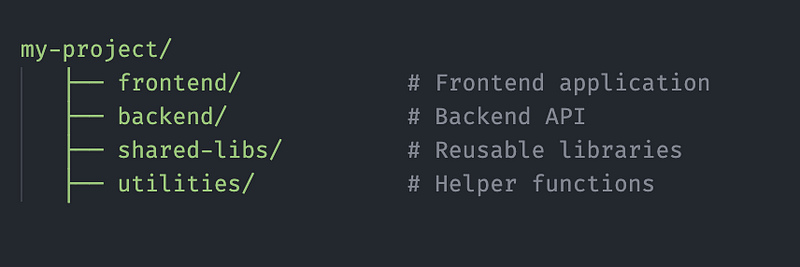
- A repository for the frontend
- A repository for the backend API
- A repository for shared libraries
- A repository for utilities or helper functions
Why Use Multi-Repo?
- Team Independence
Each team can focus on their repository without breaking the entire project. - Scalability
It’s easier to scale the project by adding new features without touching unrelated code. - Better Code Ownership
Teams or individuals can take ownership of specific parts of the project. - Easier CI/CD Management
You can deploy and test different parts of the project independently. - Reduced Merge Conflicts
Since teams work in separate repositories, there are fewer merge conflicts.
Setting Up a Multi-Repo Structure
Step 1: Plan Your Project Structure
Decide how to split your project logically. A typical structure could be:
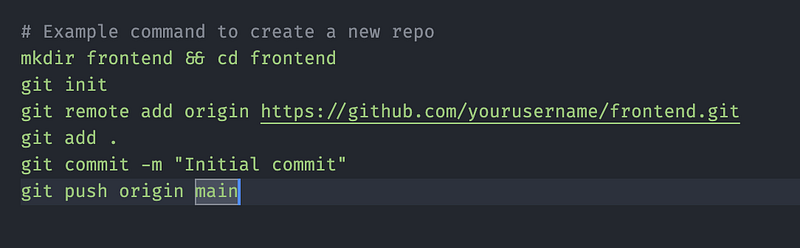
Step 2: Set Up Each Repository
For each part of the project, create a separate GitHub repository:
Step 3: Managing Dependencies
In a multi-repo setup, you’ll likely need shared dependencies across different projects. Some common ways to handle this:
- Use private npm packages to share components/utilities across repos.
- Use Git submodules to share common code.
- Use monorepo tools like Nx or Yarn Workspaces (if monorepo fits better).
Step 4: Communication Between Repositories
Your frontend app may need to interact with the backend service. Consider using:
- REST APIs
- GraphQL
- WebSockets
Ensure API endpoints are well-documented so that developers can integrate smoothly.
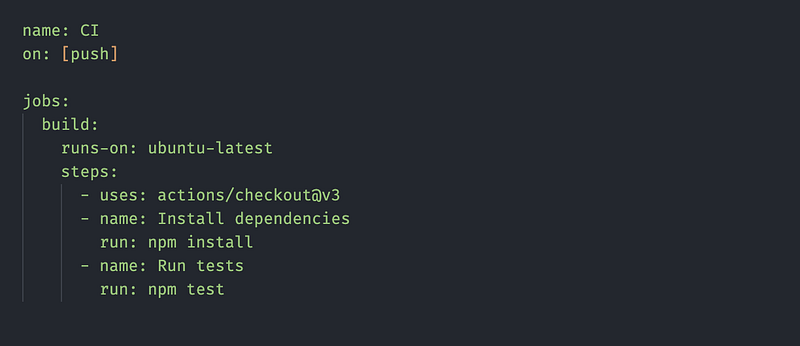
Step 5: CI/CD Setup for Each Repo
Set up automated testing and deployment pipelines for each repository using GitHub Actions or Jenkins.
Example GitHub Actions workflow for the frontend:
Step 6: Synchronizing Changes Across Repositories
When updating shared dependencies, ensure all repositories stay up to date by:
- Regular sync meetings.
- Documenting changes in a shared Confluence or Notion workspace.
- Using versioning tools to track updates.
Challenges of Multi-Repo Architecture
While multi-repo offers many advantages, there are some challenges to consider:
- Increased Overhead
Managing multiple repositories requires extra effort. - Coordination Between Teams
Effective communication is needed to avoid integration issues. - Dependency Management
Keeping dependencies in sync across repos can be tricky.
Multi-repo architecture can be a great way to scale your projects and improve team efficiency.
By carefully planning the project structure, managing dependencies, and setting up CI/CD pipelines, you can reap the benefits of a well-organized codebase.
If you’re working in a team environment and want better separation of concerns, multi-repo is definitely worth considering!
Did you find this helpful? Give a Clap and Share it with your friends!
My React Native Animation Series:
For more updates: subscribe to my medium account.
Thank you for reading 😊